3.19.2026
min read

Lorem ipsum dolor sit amet, consectetur adipiscing elit. Suspendisse varius enim in eros elementum tristique. Duis cursus, mi quis viverra ornare, eros dolor interdum nulla, ut commodo diam libero vitae erat. Aenean faucibus nibh et justo cursus id rutrum lorem imperdiet. Nunc ut sem vitae risus tristique posuere.
Lorem ipsum dolor sit amet, consectetur adipiscing elit. Suspendisse varius enim in eros elementum tristique. Duis cursus, mi quis viverra ornare, eros dolor interdum nulla, ut commodo diam libero vitae erat. Aenean faucibus nibh et justo cursus id rutrum lorem imperdiet. Nunc ut sem vitae risus tristique posuere.
Lorem ipsum dolor sit amet, consectetur adipiscing elit. Suspendisse varius enim in eros elementum tristique. Duis cursus, mi quis viverra ornare, eros dolor interdum nulla, ut commodo diam libero vitae erat. Aenean faucibus nibh et justo cursus id rutrum lorem imperdiet. Nunc ut sem vitae risus tristique posuere.
Teams that handle invoices, receipts, contracts, or bank statements know how much time disappears into manual data entry. Files arrive in different formats and layouts, and someone has to read, retype, and check the data before anything useful happens. Intelligent document processing (IDP) exists to remove that bottleneck.
Intelligent document processing is a category of technology that reads, extracts, and structures information from documents using optical character recognition (OCR), machine learning, and language understanding. Instead of treating files as static images, IDP software turns them into clean, usable data that can flow directly into your systems and workflows.
IDP systems are designed to work across structured, semi-structured and unstructured documents.
Modern IDP platforms combine OCR, computer vision, and language models to reliably extract information from all three document types, even when layouts change or documents arrive in mixed batches. For example, platforms like Invofox provide developer-friendly APIs that allow teams to integrate document extraction directly into their workflows.
Because IDP software still relies on OCR, the two terms are often confused. OCR and intelligent document processing are related, but they solve different problems.
OCR focuses on one task: turning images of text into characters. It tells you what letters or numbers appear on a page, but it does not understand what those values mean or how they relate to your process.
IDP wraps OCR inside a broader workflow. In a simple IDP vs OCR comparison, two differences stand out:
In short, OCR reads. Intelligent document processing understands and operationalizes what it reads.
Robotic process automation (RPA) is another technology often mentioned alongside intelligent document processing, but the two serve different roles.
RPA automates repetitive actions inside software systems, such as copying data between applications or triggering workflows. However, RPA typically requires structured inputs to work reliably.
IDP solves a different problem: turning unstructured documents into structured data.
In many automation architectures, the two technologies work together. IDP extracts and validates information from documents, while RPA uses that structured data to automate downstream tasks across business applications.
When you move from manual keying to IDP software, the impact shows up in accuracy, speed, cost, and compliance.
Better data quality
Algorithms do not get tired or distracted. By combining OCR, computer vision, and language models with rule based checks, IDP reduces common errors in amounts, dates, and identifiers and protects you from costly corrections.
Faster processing and better experiences
Documents that used to sit in queues for days can be processed in seconds or minutes. That speed matters in workflows such as loan decisions, insurance claims, invoice approvals, account openings, and payroll cutoffs.
Lower operating cost and happier teams
Automating repetitive data entry reduces the need for temporary staff during peak periods and frees employees to focus on exceptions, customer conversations, and analysis instead of copy paste work.
Scalability without extra headcount
Document volumes often fluctuate during tax seasons, loan surges, or busy shipping periods. IDP platforms can process large document volumes automatically, allowing organizations to scale operations without proportionally increasing staff.
Stronger compliance and auditability
IDP platforms create a clear digital trail that shows what was extracted, how it was validated, and who made changes. Combined with encryption and access controls, that traceability supports compliance in regulated sectors such as financial services and healthcare.
Many teams also rely on IDP for niche or custom documents. Flexible engines, such as the custom document capabilities in platforms like Invofox, are designed to handle that long tail of formats without weeks of template work.
When you evaluate intelligent document processing platforms, look for:
Intelligent document processing is becoming a standard way to turn unstructured documents into reliable, actionable data. With the right IDP software in place, you can reduce manual work, improve data quality, and move faster across document heavy workflows while keeping control of risk and compliance.
Modern IDP platforms can process structured, semi-structured, and unstructured documents such as invoices, receipts, bank statements, claims forms, contracts, shipping documents, and onboarding paperwork.
Older document processing systems relied heavily on templates for each document layout. Modern IDP systems use machine learning and layout detection so they can process new formats without manually creating templates for every supplier or document type.
The terms are often used interchangeably. Document AI usually refers to the broader application of machine learning models to document understanding, while IDP typically describes the end-to-end pipeline that captures, extracts, validates, and integrates document data into workflows.
Accuracy depends on the document type, image quality, and validation rules used. Most modern systems combine machine learning extraction with rule-based checks and human review for low-confidence fields to maintain high reliability in production environments.
Intelligent document processing (IDP) is quickly becoming a standard way for organizations to transform unstructured documents into reliable, actionable data.
By combining OCR, machine learning, and language understanding, IDP platforms automate document-heavy workflows that once required hours of manual work.
With the right IDP software in place, organizations can reduce operational costs, improve data accuracy, and move faster across finance, logistics, HR, lending, and other document-driven processes while maintaining strong compliance and control.
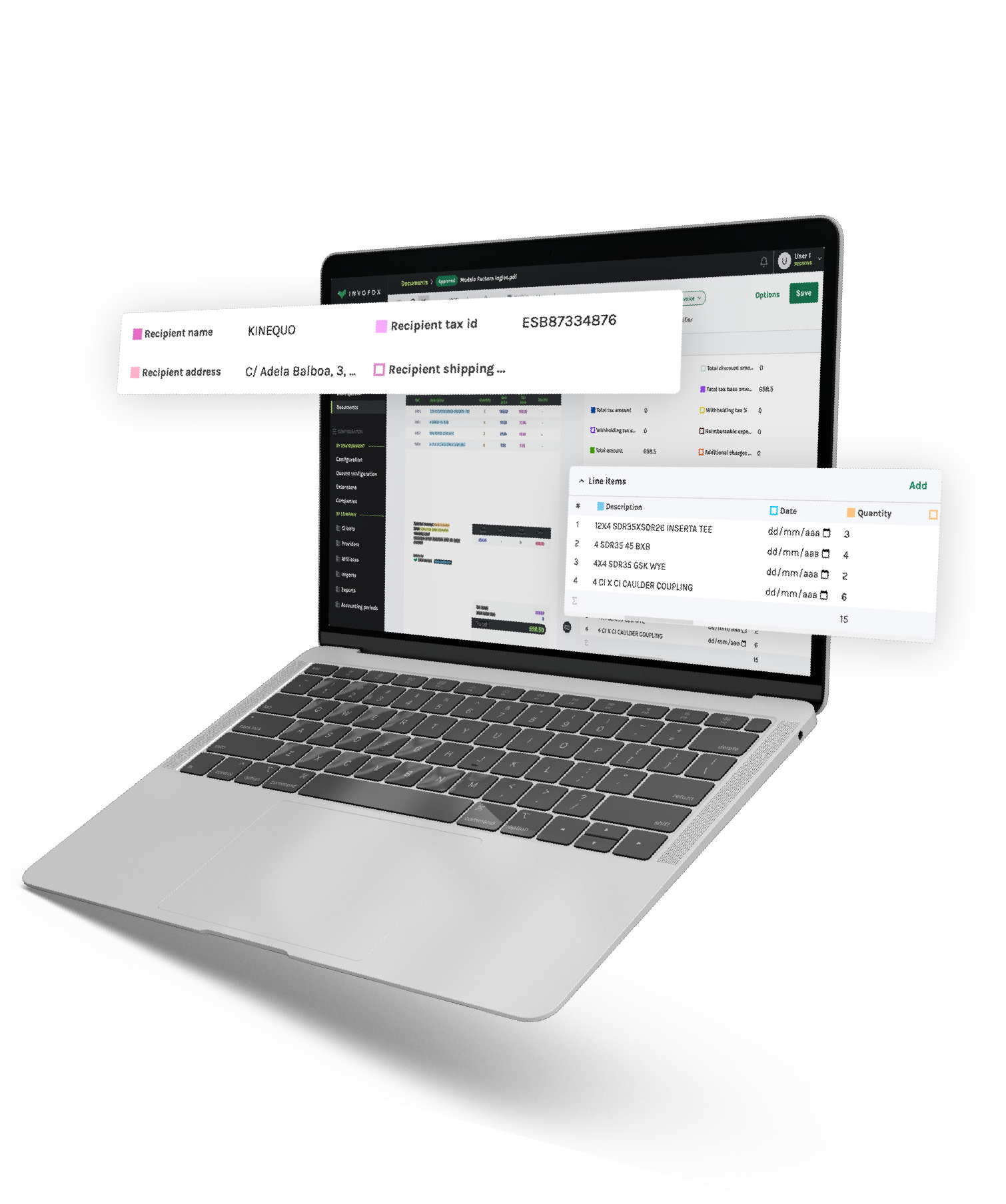
Invofox is an example of an IDP platform that was built with developers in mind. Through a single API, developers can send financial documents such as invoices and receipts, as well as niche or custom document formats. The platform can process mixed batches of documents, return structured JSON, and gives you tools to review and correct edge cases.
Invofox focuses on high accuracy, continuous learning, clear documentation, and an API-first experience, which lets teams replace manual data entry and ad hoc scripts with a scalable, production-ready document processing layer that slots cleanly into modern workflows.
Thuy Vi Nguyen is an Inbound Sales Marketing Specialist at Invofox, where she focuses on growth, demand generation, and go-to-market strategy. She has over a decade of experience in B2B SaaS across marketing, sales, and customer experience, and has led marketing initiatives for multiple technology companies.
Subscribe for tips and insights from Invofox — the intelligent document processing (IDP) platform that helps businesses automate invoices, receipts, and more.
3.19.2026
min read
Teams that handle invoices, receipts, contracts, or bank statements know how much time disappears into manual data entry. Files arrive in different formats and layouts, and someone has to read, retype, and check the data before anything useful happens. Intelligent document processing (IDP) exists to remove that bottleneck.
Intelligent document processing is a category of technology that reads, extracts, and structures information from documents using optical character recognition (OCR), machine learning, and language understanding. Instead of treating files as static images, IDP software turns them into clean, usable data that can flow directly into your systems and workflows.
IDP systems are designed to work across structured, semi-structured and unstructured documents.
Modern IDP platforms combine OCR, computer vision, and language models to reliably extract information from all three document types, even when layouts change or documents arrive in mixed batches. For example, platforms like Invofox provide developer-friendly APIs that allow teams to integrate document extraction directly into their workflows.
Because IDP software still relies on OCR, the two terms are often confused. OCR and intelligent document processing are related, but they solve different problems.
OCR focuses on one task: turning images of text into characters. It tells you what letters or numbers appear on a page, but it does not understand what those values mean or how they relate to your process.
IDP wraps OCR inside a broader workflow. In a simple IDP vs OCR comparison, two differences stand out:
In short, OCR reads. Intelligent document processing understands and operationalizes what it reads.
Robotic process automation (RPA) is another technology often mentioned alongside intelligent document processing, but the two serve different roles.
RPA automates repetitive actions inside software systems, such as copying data between applications or triggering workflows. However, RPA typically requires structured inputs to work reliably.
IDP solves a different problem: turning unstructured documents into structured data.
In many automation architectures, the two technologies work together. IDP extracts and validates information from documents, while RPA uses that structured data to automate downstream tasks across business applications.
When you move from manual keying to IDP software, the impact shows up in accuracy, speed, cost, and compliance.
Better data quality
Algorithms do not get tired or distracted. By combining OCR, computer vision, and language models with rule based checks, IDP reduces common errors in amounts, dates, and identifiers and protects you from costly corrections.
Faster processing and better experiences
Documents that used to sit in queues for days can be processed in seconds or minutes. That speed matters in workflows such as loan decisions, insurance claims, invoice approvals, account openings, and payroll cutoffs.
Lower operating cost and happier teams
Automating repetitive data entry reduces the need for temporary staff during peak periods and frees employees to focus on exceptions, customer conversations, and analysis instead of copy paste work.
Scalability without extra headcount
Document volumes often fluctuate during tax seasons, loan surges, or busy shipping periods. IDP platforms can process large document volumes automatically, allowing organizations to scale operations without proportionally increasing staff.
Stronger compliance and auditability
IDP platforms create a clear digital trail that shows what was extracted, how it was validated, and who made changes. Combined with encryption and access controls, that traceability supports compliance in regulated sectors such as financial services and healthcare.
Many teams also rely on IDP for niche or custom documents. Flexible engines, such as the custom document capabilities in platforms like Invofox, are designed to handle that long tail of formats without weeks of template work.
When you evaluate intelligent document processing platforms, look for:
Intelligent document processing is becoming a standard way to turn unstructured documents into reliable, actionable data. With the right IDP software in place, you can reduce manual work, improve data quality, and move faster across document heavy workflows while keeping control of risk and compliance.
Modern IDP platforms can process structured, semi-structured, and unstructured documents such as invoices, receipts, bank statements, claims forms, contracts, shipping documents, and onboarding paperwork.
Older document processing systems relied heavily on templates for each document layout. Modern IDP systems use machine learning and layout detection so they can process new formats without manually creating templates for every supplier or document type.
The terms are often used interchangeably. Document AI usually refers to the broader application of machine learning models to document understanding, while IDP typically describes the end-to-end pipeline that captures, extracts, validates, and integrates document data into workflows.
Accuracy depends on the document type, image quality, and validation rules used. Most modern systems combine machine learning extraction with rule-based checks and human review for low-confidence fields to maintain high reliability in production environments.
Intelligent document processing (IDP) is quickly becoming a standard way for organizations to transform unstructured documents into reliable, actionable data.
By combining OCR, machine learning, and language understanding, IDP platforms automate document-heavy workflows that once required hours of manual work.
With the right IDP software in place, organizations can reduce operational costs, improve data accuracy, and move faster across finance, logistics, HR, lending, and other document-driven processes while maintaining strong compliance and control.
Invofox is an example of an IDP platform that was built with developers in mind. Through a single API, developers can send financial documents such as invoices and receipts, as well as niche or custom document formats. The platform can process mixed batches of documents, return structured JSON, and gives you tools to review and correct edge cases.
Invofox focuses on high accuracy, continuous learning, clear documentation, and an API-first experience, which lets teams replace manual data entry and ad hoc scripts with a scalable, production-ready document processing layer that slots cleanly into modern workflows.
Thuy Vi Nguyen is an Inbound Sales Marketing Specialist at Invofox, where she focuses on growth, demand generation, and go-to-market strategy. She has over a decade of experience in B2B SaaS across marketing, sales, and customer experience, and has led marketing initiatives for multiple technology companies.



Subscribe for tips and insights from Invofox — the intelligent document processing (IDP) platform that helps businesses automate invoices, receipts, and more.
Utilizado por más de 150 empresas.